
What is web terminal in stock trading?
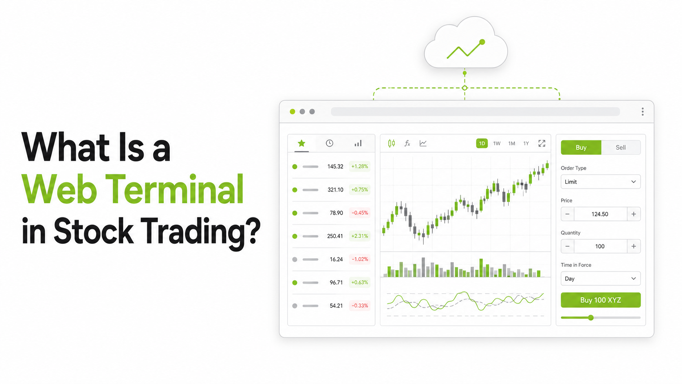
If you trade on your phone, a web terminal can feel like the point where your setup starts getting serious.
In simple terms, a web terminal in stock trading is a browser-based trading platform that lets you analyse charts, place orders, monitor positions, and manage trades from a desktop or laptop without installing heavy software. That is the short answer to what is web terminal in stock trading.
For Indian traders, especially those moving from occasional investing to intraday, F&O, or multi-screen market tracking, web terminal trading often sits between convenience and control. You still get easy browser access, but now with a larger workspace, richer charting, and faster decision-making than a small mobile screen usually allows.
A good web terminal is not just “a broker website with a buy button.” It should help you do a few things well:
- Read the market clearly
- Act quickly
- Manage risk without confusion
That matters because active traders do not just need access. They need a clean workflow. A platform that forces constant switching between charting tabs, messaging groups, order windows, and position screens can slow decisions right when speed matters.
That is where a modern desktop trading platform India users can open in the browser starts to make sense. Platforms such as Lemonn’s web terminal are built around integrated charting and order execution, so analysis and action can happen in one place. Lemonn also offers a TradingView-powered charting experience, which is useful for traders who want desktop-grade chart workflows without extra platform friction.
Still, keep expectations realistic. A better terminal can improve clarity and speed, but it cannot remove market risk. SEBI’s updated study found that 93% of individual F&O traders incurred losses between FY22 and FY24, which is a reminder that tools should support discipline, not overconfidence (SEBI’s 2024 press release).
Why your choice of web terminal trading platform matters
Many traders underestimate platform choice because most trading apps look similar at first. You log in, see prices, place orders, and assume the rest is mostly branding.
But the actual trading experience can vary a lot.
Your platform affects:
- How quickly you spot setups
- How easily you compare timeframes or symbols
- How many steps it takes to place or exit a trade
- How much platform-switching interrupts your attention
- How safely your account and data are handled
For a long-term investor who buys once a month, these differences may not matter much. For an expiry-day trader, scalper, or active F&O participant, they matter a lot. Even small delays or extra clicks can affect execution quality, especially in fast-moving contracts. If you are comparing fast setups, options scalping terminal features and fast order execution considerations become workflow issues, not just feature lists.
So the right way to evaluate a platform is simple. Ignore the marketing labels for a moment and ask whether it actually helps you think and act better.
The 7-point checklist for evaluating a web terminal
If you are choosing a platform for web terminal trading, use this checklist.
“Start investing with confidence! Explore
0 demat account
and grow your wealth.”
1. Charting depth
Can you use multiple indicators, save layouts, switch timeframes smoothly, and compare instruments without clutter?
2. Execution flow
Can you place orders from the same workspace where you analyse charts, or do you keep jumping between windows?
3. Responsiveness
Does the terminal feel quick during market hours, especially when markets are volatile?
4. Power features
Does it support tools that help active traders, such as longer-validity orders, quick exits, or smart order assistance?
5. Trust and regulation
Is the broker SEBI-registered, exchange-connected, and clear about legal, operational, and grievance channels?
6. Security
Does the platform clearly explain security standards, encryption, and account-protection practices?
7. Cost and convenience
Do pricing, account access, and integrated features make sense for your trading style, or are you paying in hidden friction?
Think of this checklist as a filter. The goal is not to find the platform with the loudest feature list. It is to find one that fits how you actually trade.
Charting depth: indicators, layouts, and multi-chart workflows
For many traders, charting is the main reason to use a web terminal at all.
A mobile app is fine for checking prices, reviewing holdings, or making occasional trades. Desktop charting starts to matter when you want to:
- Track multiple watchlist names at once
- Compare different timeframes
- Layer indicators without compressing the screen
- Keep layouts consistent across sessions
- Review price action with less visual noise
This is where a browser-based terminal can beat the phone experience. On a larger screen, you can keep your chart, order panel, watchlist, and positions visible together. That cuts context switching and can help you stay aligned with your process.
When comparing terminals, look for:
- TradingView or similarly mature charting support
- Indicator variety
- Saved layouts
- Multi-chart or split-screen flexibility
- Clean symbol switching
- Stable chart loading during live sessions
Lemonn’s web terminal guide highlights multi-screen analysis and integrated order execution, while its TradingView desktop experience focuses on charting and trading from the same environment. If your strategy depends on reading multiple setups side by side, that matters more than cosmetic design.
If you want a broader view of how split-screen and trading-from-charts features help active options workflows, split-screen options trading apps is also relevant.
Execution quality: order window, responsiveness, and fewer platform switches
A charting interface may look polished, but execution quality decides whether the platform works under pressure.
The best web terminals usually make the order flow simple:
- Select instrument
- Review price and quantity
- Choose order type
- Place trade
- Track and manage it immediately
That sounds basic. Even so, many traders still deal with fragmented workflows. They analyse on one charting platform, confirm prices elsewhere, and place the order in a separate broker interface. Every extra handoff creates delay, distraction, and room for error.
Integrated web terminal trading reduces that friction. The benefit is not just speed. It is also mental clarity. When the chart, order entry, and position management sit in one place, you spend less time rebuilding context.
This matters even more for traders who use rapid-entry workflows, such as expiry-day or scalping setups. If that is your use case, fastest options broker experience and one-tap exits for options scalping become core evaluation points.
A useful question to ask is: Can I analyse, enter, modify, and exit without feeling like I am fighting the interface?
If the answer is no, the terminal may look good, but it is not efficient.
Power features that matter for active traders: GTD, quick exits, and order assistance
Not every trader needs advanced tools. But if you trade actively, a few features can decide whether the setup feels workable or frustrating.
GTD or longer-validity orders
A good terminal should support order flexibility beyond intraday-only behaviour. Longer-validity order types can help traders who wait for levels instead of chasing price.
Lemonn has introduced GTD orders, which are useful for traders who want a pending order to remain valid longer instead of re-entering it repeatedly.
Quick exits
Exit speed is not just about convenience. It is a risk-management feature.
In fast markets, reducing the number of taps or confirmations needed to close a position can matter. Lemonn’s Exit Now and Exit All tools are built for that use case, especially for traders handling multiple open F&O positions. For a deeper comparison, instant exit versus auto square-off explains why instant exits matter.
Order assistance
Active traders often need help with entries, not predictions. That means tools that assist with price placement, not tools that imply certainty.
Lemonn’s Dash is positioned as a smart price assistant, and Dash’s product update explains how it is meant to help with order placement. Similarly, Slicing is designed to split larger F&O orders into smaller parts for smoother execution.
These improve workflow. They do not remove trading risk, but they can reduce manual friction.
Trust and safety checks: broker regulation, security, and platform reliability
If you are evaluating what is web terminal in stock trading in practical terms, trust checks matter as much as features.
Start with broker legitimacy.
In India, you should verify whether the broker is listed through official channels such as SEBI’s recognised intermediaries database and NSE’s Know Your Broker facility. This is basic hygiene before opening an account, no matter how modern the app looks.
For Lemonn, the entity details and disclosures are available on its regulatory information page. The published brand context states that broking is offered by NU Investors Technologies Private Limited, with SEBI registration, NSE and BSE membership, and CDSL depository participation.
Then assess security and operational transparency. A trustworthy platform should clearly communicate:
- Regulatory registrations
- Privacy and terms
- Risk disclosures
- Investor grievance channels
- Security standards
- Support availability
Lemonn positions itself around SEBI regulation, ISO/IEC 27001:2022 certification, and bank-grade encryption, alongside a safe broker checklist. Those signals matter because web access should not mean weaker control.
Reliability matters too, even if it is less visible. A web terminal should stay usable under normal market pressure, load charts consistently, and avoid making order management harder than necessary. You will not know everything before using it, but you can often judge quality from how clearly the platform explains its features, risks, and support structure.
Cost and convenience: pricing, access, and whether charting and trading are integrated
Sometimes the cheapest platform is not the most efficient. Sometimes the most feature-rich one is not the easiest to use. The right balance is the one that lowers total friction.
When assessing costs, do not look only at brokerage. Also check:
- Whether desktop access is included
- Whether charting is integrated or requires another tool
- Whether advanced workflows need extra subscriptions
- Whether the pricing is simple enough to predict
- Whether the account can support investing and trading in one place
Lemonn publishes flat pricing of ₹20 per executed order across equity delivery, intraday, futures, and options, which you can review in its brokerage charges explainer. If you want to estimate transaction impact, its brokerage calculator is relevant.
Convenience matters too. If one account lets you move between stocks, ETFs, IPOs, mutual funds, and F&O while also giving desktop trading access, that reduces operational clutter. Lemonn positions itself as an all-in-one setup through its trading app and broader platform overview.
For traders who also use leverage-related products, it helps to separately understand the risks before acting. Is MTF safe in India? and What is Margin Trading Facility (MTF) in India? can help frame that decision responsibly. Rates and charges are subject to change.
Who should use a web terminal and who may not need one?
A web terminal is useful, but not everyone needs one.
A web terminal may suit you if:
- You actively trade intraday or F&O
- You rely on chart-based decisions
- You want desktop screen space for cleaner analysis
- You dislike switching between charting and order-entry tools
- You monitor multiple positions or symbols at once
- You value quick exits and order-management shortcuts
You may not need one yet if:
- You mainly invest for the long term
- You place only occasional delivery trades
- You are comfortable doing everything on mobile
- You are still learning basics and want the simplest possible setup
- You do not use charts, watchlists, or active order-management tools often
In other words, a desktop trading platform India traders use through the browser is not automatically “better” for everyone. It is better when your workflow has outgrown mobile-only trading.
For many users, the sensible progression is simple. Start basic, then move to a web terminal once you need more screen space, better charting, or tighter execution flow. If you are still figuring out your style, F&O vs intraday vs swing trading and how to choose a good stockbroker in India can help you decide what kind of platform fit matters most.
Final takeaway
So, what is web terminal in stock trading?
It is a browser-based trading workspace that brings charting, order placement, trade monitoring, and position management into a desktop-friendly interface. But the better question is not just what it is. It is whether the terminal helps you trade with more clarity, less friction, and tighter control.
The best web terminal trading setup is not the one with the most buzzwords. It is the one that gives you:
- Better chart visibility
- Cleaner execution
- Useful power features
- Credible regulation and security
- Simple, understandable pricing
- A workflow that fits your style
For many retail traders in India, that means choosing a platform where charting and execution are integrated, trust checks are easy to verify, and the experience supports discipline rather than impulse.
Investments in the securities market are subject to market risks. Read all related documents carefully before investing or trading. Past performance is not indicative of future results.
FAQs about choosing a web terminal trading platform
Is web terminal trading better than mobile trading?
Not always. Web terminal trading is usually better for active traders who need charting depth, larger screen space, and faster position management. Mobile is often enough for casual investors or simple order placement.
What is web terminal in stock trading for beginners?
For beginners, it means a browser-based trading platform where you can view charts, place orders, and track positions on a laptop or desktop. If you are just starting, mobile may feel simpler at first, while a web terminal becomes more useful as your workflow grows.
What should I check before using a desktop trading platform in India?
Check regulation, exchange membership, security standards, pricing transparency, order types, charting depth, and how easily you can verify the broker. Official checks through SEBI’s intermediary records and NSE’s Know Your Broker are a good place to start.
Do I need to install software to use a web terminal?
Usually no. That is one of the main benefits. A web terminal runs in your browser, which makes access easier across devices.
Which features matter most for active traders?
Look for integrated charting, responsive order entry, quick exits, smart order assistance, saved layouts, and support for advanced workflows. If you trade options actively, features like Exit Now and Exit All or GTD orders can be especially useful.
Can a better web terminal improve my trading results?
It can improve workflow, speed, and discipline, but it cannot guarantee profits. Trading outcomes still depend on skill, risk management, market conditions, and psychology. SEBI’s studies on retail F&O losses are a reminder that tools help execution, not certainty.
Disclaimer
The stocks mentioned in this article are not recommendations. Please conduct your own research and due diligence before investing. Investment in securities market are subject to market risks, read all the related documents carefully before investing. Please read the Risk Disclosure documents carefully before investing in Equity Shares, Derivatives, Mutual fund, and/or other instruments traded on the Stock Exchanges. As investments are subject to market risks and price fluctuation risk, there is no assurance or guarantee that the investment objectives shall be achieved. Lemonn (Formerly known as NU Investors Technologies Pvt. Ltd) do not guarantee any assured returns on any investments. Past performance of securities/instruments is not indicative of their future performance.
Related Posts
Download Lemonn
Download my app for share market trading, ipo investment, trading account, and all your investment needs.



