TradingView broker integration vs separate chart and broker setup: what changes for traders?
If you trade actively, your setup shapes your behaviour more than you think.
A trader who analyses on one screen and executes on another is not just using two tools. They are adding extra steps between idea and action. That matters when the market is moving fast, spreads widen, or you need to set a stop-loss and target without hesitation.
That is why tradingview broker integration is such an important point of comparison for Indian traders. The real question is not whether charts look better. It is whether the path from analysis to order placement gets cleaner, faster, and easier to control.
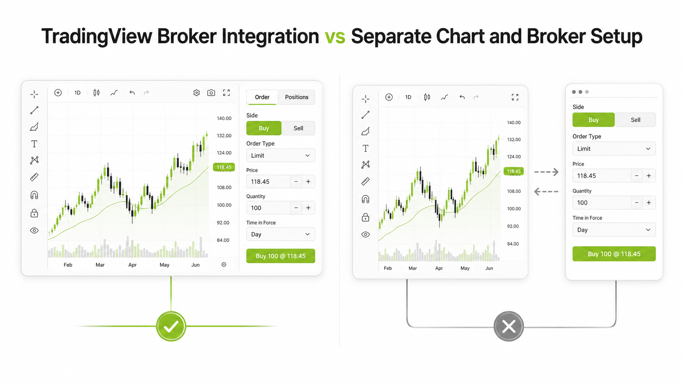
For traders evaluating desktop workflows, the comparison usually comes down to this:
- Integrated setup: Charting and execution work together in one connected terminal.
- Separate setup: You analyse on TradingView or another charting platform, then place orders in a separate broker app or tab.
Both can work. But they feel very different in live markets.
For Indian traders asking which Indian trading platform lets me trade directly from TradingView charts or which Indian broker has a TradingView integrated web terminal without separate login, the answer depends less on marketing copy and more on execution flow, risk controls, and how much friction sits between spotting a setup and acting on it.
A platform like Lemonn’s TradingView-powered terminal is built around that all-in-one workflow, combining charting with broker-side execution in one web experience. If you want a broader look at the desktop setup, the Lemonn Web Terminal guide shows how it is meant to work in practice.
What ‘tradingview broker integration’ actually means in practice
In plain English, tradingview broker integration means your charting interface and broker execution layer are connected closely enough that you can move from market analysis to order placement with minimal switching.
That can show up in different ways across platforms, but in practice traders usually expect some or all of the following:
- Linked chart and order flow
- Faster order entry from the same workspace
- Visible positions while watching the chart
- Quicker stop-loss and target handling
- Less dependence on copy-pasting symbols, strikes, or prices
TradingView itself supports broker-connected trading workflows through its platform features and help ecosystem, but the actual experience depends on how the broker implements that connection and what instruments, order flows, and risk controls are available in that market context. TradingView’s help and support documentation makes it clear that broker connectivity is part of the platform experience, but execution quality still depends on the connected broker setup.
In India, that distinction matters. Many traders assume “TradingView available” means “trade directly from charts with no friction.” Not always. Some platforms offer TradingView-style charts but still require extra steps, separate windows, or repeated logins before an order is actually placed.
So when traders search for which Indian broker has a TradingView integrated web terminal without separate login, they are really asking a deeper question: Can I analyse and execute in one connected session, or am I still stitching together multiple tools?
How a separate chart and broker setup works for most Indian traders
The split workflow is familiar.
A trader opens TradingView or another charting tool to mark levels, check indicators, and watch price action. When they decide to act, they switch to the broker terminal or app, search the instrument again, select quantity, review margin, place the order, and then monitor the position there.
That setup is common because it works. For many traders, especially those who focus heavily on research or do not trade at high speed, it can be enough.
A typical separate setup often looks like this:
- Open Charts On One Platform.
- Identify Entry, Invalidation, And Target Levels.
- Switch To The Broker Window Or Mobile App.
- Search The Instrument Or Contract Again.
- Enter Order Details Manually.
- Set Or Adjust Stop-Loss And Exit Logic Separately.
- Toggle Between Screens To Monitor The Trade.
This approach is not automatically bad. It just creates more room for delay and manual error.
That matters even more in options and intraday trading, where speed, visibility, and clean exits count. Traders comparing setups may also want to think beyond chart quality and look at execution tools like fast order execution, split-screen trading workflows, and instant-exit features.
“Start investing with confidence! Explore
share market
and grow your wealth.”
The real difference: analysis-to-order flow when every second counts
This is where the comparison gets practical.
When markets are calm, a few extra clicks may not feel important. When price is moving quickly, every extra switch adds cognitive load. You are no longer just reading the market. You are managing tabs, symbols, order tickets, and timing.
An integrated setup changes that flow in four useful ways:
1. It Cuts Context Switching
When analysis and execution happen on the same screen, you do not have to keep re-orienting yourself. The chart stays in view while you think, decide, and act.
2. It Reduces Manual Re-Entry
Re-entering symbol names, strike details, or order parameters sounds minor until you do it multiple times in a volatile session. Friction adds up.
3. It Speeds Up Trade Management
Once an order is live, traders often need to react quickly. Managing stops, targets, and exits from a connected workspace is usually cleaner than bouncing between apps.
4. It Supports Better Discipline
Convenience is not the goal. Process consistency is. If your execution path is simpler, you are more likely to use defined entries and exits instead of improvising.
That is why active traders often compare not just broker charges, but workflow quality too. For a wider view on execution-sensitive platforms, posts on the fastest-feeling options brokers and options scalping terminals in India are relevant to the same decision.
Where integrated chart trading reduces friction: entries, stop-losses, targets, and position monitoring
The biggest benefit of an integrated terminal is not that it makes trading “easy.” It makes trading less fragmented.
Here is where that matters most.
Entries
When a setup confirms, traders want a short path from observation to action. Integrated chart trading can cut delay because the chart, instrument context, and order flow sit closer together.
Stop-Losses
A stop-loss should be part of the trade plan, not an afterthought. In a separate setup, traders sometimes place the entry first and then scramble to add protection. A more connected flow makes it easier to think in complete trade structures, not just isolated entries. For beginners reviewing the basics, how to use stop loss in stock trading in India remains essential reading.
Targets
Target setting also improves when the chart and execution window are linked. Traders can align exits with visible chart structure instead of relying only on memory or rough price input.
Position Monitoring
Once in a trade, the battle is psychological as much as technical. Seeing positions alongside the live chart can help traders monitor without constantly switching context. That matters in scalping, expiry-day trades, and active F&O workflows, where quick adjustment and exit discipline often matter more than the original entry.
On Lemonn’s side, the desktop workflow is strengthened by power features such as GTD orders, Slicing, Dash, and quick exit tools in the web terminal environment. Those features are covered in updates on GTD orders, Slicing, and Exit Now and Exit All.
Where a separate setup can still work fine: research-heavy or low-frequency traders
Not every trader needs integrated chart execution.
A separate chart-plus-broker setup can still be perfectly reasonable if you:
- Trade Infrequently
- Take Swing Trades Rather Than Fast Intraday Setups
- Spend More Time On Research Than On Execution Speed
- Prefer A Dedicated Research Workspace
- Use Alerts And Enter Orders Only Occasionally
For these traders, the main bottleneck may not be switching tabs. It may be trade selection, patience, or sizing discipline.
If your trades are planned well in advance and entered less often, the efficiency gain from integration may be modest. In that case, factors like brokerage, platform stability, and account type may matter more than same-screen execution. Traders comparing fit by usage pattern may find it helpful to review a demat account comparison by usage type or a broader guide to choosing a good stockbroker in India.
Execution realities traders should compare before choosing a setup
If you are evaluating platforms, do not stop at “has TradingView” on the feature page.
Compare the actual trading experience using questions like these:
- Can You Place Orders From The Same Working Environment As The Chart?
- Do You Need A Separate Login Or Separate App To Execute?
- Can You Monitor Open Positions Without Leaving The Charting View?
- How Fast Is Order Modification During Volatile Markets?
- Are Stop-Loss And Exit Tools Practical, Not Just Available On Paper?
- Does The Platform Support The Instruments You Actually Trade Most?
- Are Desktop Power Features Built For Real Sessions Or Just Marketing Screenshots?
- Is Pricing Transparent Across Equity, Intraday, Futures, And Options?
This is also where cost and workflow meet. Lemonn’s published pricing is a flat ₹20 per executed order across equity delivery, intraday, futures, and options, which traders can verify alongside other charges in its brokerage charges explainer and brokerage calculator. Rates and charges are subject to change.
Risk control matters more than convenience, especially in F&O
Convenience helps. But it should never be mistaken for edge.
F&O and intraday trading carry high risk, and the evidence on retail outcomes in India is sobering. In a September 2024 press release, SEBI reported that 93% of individual traders incurred losses in equity F&O between FY22 and FY24. Investments in the securities market are subject to market risks.
That is why the right setup is the one that supports discipline, not impulse.
When comparing integrated terminals, prioritise risk controls such as:
- Defined Stop-Loss Handling
- Clear Margin Visibility
- Fast Exit Access
- Low-Friction Order Review
- Stable Position Monitoring
- Tools That Help You Execute A Plan, Not Chase The Market
If you trade leveraged products or use funding features, the need for discipline increases further. Related reading on is MTF safe in India, the risks of MTF, and safe leverage sizing helps put workflow decisions in the right context. Past performance is not indicative of future results.
Checklist: how to evaluate an Indian platform offering TradingView-linked execution
If you are actively comparing brokers, use this practical checklist.
Platform Evaluation Checklist
- Check Whether TradingView Is Truly Linked To Execution. Some platforms offer charting access without a genuinely connected trade flow.
- Check Whether You Need A Separate Login After Opening The Chart. This is critical for traders specifically asking which Indian broker has a TradingView integrated web terminal without separate login.
- Check Whether Positions, Orders, And Charts Stay Visible In One Session.
- Check Whether Order Placement Feels Native On Desktop.
- Check Whether Stop-Loss And Target Management Are Fast Enough For Your Style.
- Check Whether Exit Tools Are Built For Volatile Sessions.
- Check Whether Pricing Is Flat And Transparent.
- Check Whether The Broker Is Properly Regulated And Easy To Verify.
- Check Whether The Setup Suits Your Actual Trading Frequency, Not Your Aspirations.
- Check Whether The Broking Platform Helps You Stay Structured Under Pressure.
On trust and verification, traders should always prefer regulated brokers and verify details through official regulatory and broker disclosures. SEBI’s investor protection framework remains the authoritative reference point, while Lemonn’s own regulatory information page outlines its registrations and memberships.
Why an all-in-one web terminal can suit traders who want charting and execution on the same screen
For active Indian traders, especially in intraday and F&O, an all-in-one terminal often wins not because it is flashy, but because it removes avoidable friction.
If your trading style depends on:
- Watching Price Action Closely
- Acting Quickly On Confirmed Setups
- Setting Stops And Targets Without Delay
- Monitoring Positions Continuously
- Exiting Fast When The Market Invalidates The Trade
then having charting and execution in one connected terminal can be a meaningful advantage.
This is where Lemonn’s positioning is clear. It combines a TradingView-powered web terminal with broker-side execution and added trader tools such as Dash, Slicing, GTD orders, and fast-exit controls. For active F&O traders who also want more structure, the platform extends beyond charting into signals and execution workflows through Zing, BOLT, and the broader F&O trading experience.
That does not mean an integrated setup is automatically right for everyone. But if your current process involves charting in one place, trading in another, and constantly re-checking whether you entered the right instrument, quantity, or exit plan, the case for consolidation gets stronger.
In other words, the most useful answer to “which Indian trading platform lets me trade directly from TradingView charts” is not just the platform name. It is the one whose workflow helps you stay faster, clearer, and more disciplined when it matters.
FAQs on tradingview broker integration in India
What is tradingview broker integration?
It means your charting interface and broker execution flow are connected closely enough that you can analyse and place trades with less switching between tools. The exact experience depends on how the broker has implemented the TradingView-linked workflow.
Which Indian trading platform lets me trade directly from TradingView charts?
Indian traders should look for platforms that offer a genuinely connected TradingView-powered terminal rather than only TradingView-style charts. Lemonn’s TradingView terminal is built around that integrated desktop workflow.
Which Indian broker has a TradingView integrated web terminal without separate login?
The practical answer is: look for a broker where charting and execution stay inside one connected session. Lemonn positions its web terminal as an all-in-one desktop experience designed to reduce switching between charting and order placement.
Is integrated chart trading always better than a separate setup?
Not always. If you are a low-frequency or research-heavy trader, a separate setup can still work well. But active intraday and F&O traders often benefit more from lower execution friction.
Does convenience reduce trading risk?
No. Convenience can improve process, but it does not remove market risk. SEBI’s study shows most individual F&O traders lose money, so risk controls, position sizing, and disciplined exits matter more than interface design alone.
What should I compare before choosing a TradingView-linked broker in India?
Compare the actual order flow, separate-login requirements, stop-loss handling, exit speed, pricing transparency, platform stability, and regulatory credibility. Good workflow is useful, but only if it supports disciplined execution.
Disclaimer
The stocks mentioned in this article are not recommendations. Please conduct your own research and due diligence before investing. Investment in securities market are subject to market risks, read all the related documents carefully before investing. Please read the Risk Disclosure documents carefully before investing in Equity Shares, Derivatives, Mutual fund, and/or other instruments traded on the Stock Exchanges. As investments are subject to market risks and price fluctuation risk, there is no assurance or guarantee that the investment objectives shall be achieved. Lemonn (Formerly known as NU Investors Technologies Pvt. Ltd) do not guarantee any assured returns on any investments. Past performance of securities/instruments is not indicative of their future performance.
Related Posts



Download Lemonn
Download my trading app for SIP, demat account services—get a free demat account with our demat apps.