
EPFO Provident Fund Account Transfer: Step-by-Step Guide
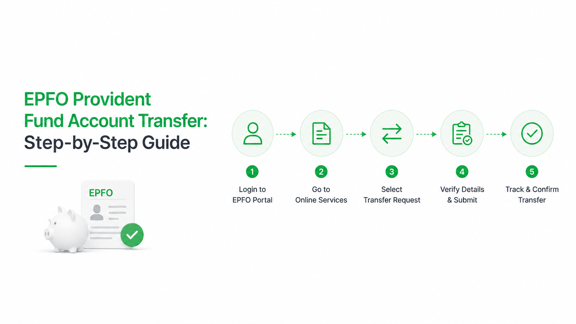
An EPFO provident fund account transfer moves the balance and service record from your previous employer’s provident fund account to the account linked to your current employer.
You can complete the process online through the Employees’ Provident Fund Organisation (EPFO) Unified Member Portal. Eligible members can use Request for Transfer of Account or access the transfer option through Member Service History.
The process is now largely online and paperless. Employer approval has also been removed in most eligible cases, making it easier to consolidate your retirement savings after changing jobs.
What happens during an EPF account transfer?
Your employer creates a new Member Identification number (Member ID) when you join a new organisation. Your Universal Account Number (UAN) usually remains the same, but the balance under your old Member ID must be transferred to the new one.
An Employees’ Provident Fund (EPF) transfer moves:
- Your provident fund balance, including eligible interest
- Your previous employment and service details
- Information required to calculate pension benefits
The Employees’ Pension Scheme (EPS) contribution may not appear as a separate cash transfer. EPFO mainly carries forward the relevant service period for pension calculations.
No Employees’ Deposit Linked Insurance (EDLI) balance is transferred between accounts.
This means that seeing only the EPF amount in your new passbook does not necessarily indicate that your pension service has been lost.
Check these details before starting the transfer
Review the following information before submitting your claim:
| Requirement | What to check |
| UAN | It should be active and accessible |
| Aadhaar | It should be linked with your UAN |
| Mobile number | It should receive Aadhaar-linked One-Time Passwords (OTPs) |
| Personal details | Name, date of birth, and gender should match across records |
| Employment history | Previous and current Member IDs should be visible |
| Date of exit | Your previous employer’s exit date should be updated |
| Know Your Customer details | Aadhaar, Permanent Account Number (PAN), and bank details should be correct |
| Current employment | Your new Member ID should be active |
Before filing a request, check your current EPF passbook. If your old balance already appears as a transfer credit, the transfer may have happened automatically.
“Start investing with confidence! Explore
0 demat account
and grow your wealth.”
How to transfer an EPFO provident fund account online
Step 1: Log in to the EPFO member portal
Visit the official EPFO Unified Member Portal and log in using your UAN, password, and CAPTCHA.
Use only the official EPFO website. Online transfer services are free, and you should never share your password or OTP with an agent, employer representative, or cybercafe operator.
Step 2: Review your service history
Go to Online Services and select Member Service History.
This section shows the employers and Member IDs linked with your UAN. Check that:
- Your previous employer appears correctly
- Your current employer and Member ID are visible
- Your dates of joining and exit are accurate
- No transfer claim is already pending or completed
The portal may display a Claim option beside an old Member ID that is eligible for transfer.
Step 3: Open the transfer request page
You can access the transfer request through either of these routes:
Route 1: Online Services > Request for Transfer of Account
Route 2: Online Services > Member Service History > Claim
The exact menu labels may change when EPFO updates its portal, but both routes lead to the online Form 13 transfer process.
Step 4: Verify personal and employment details
The portal will display your personal information, UAN, current Member ID, and current establishment details.
Check each field carefully. Do not proceed if:
- The current employer is incorrect
- Your name or date of birth does not match Aadhaar
- The destination Member ID is not your active account
Incorrect details can lead to rejection or transfer delays.
Step 5: Select the previous Member ID
Enter or choose the Member ID linked to your former employer. Click Get Details to retrieve the old account.
Confirm the following information:
- Establishment name
- Date of joining
- Date of exit
- Previous Member ID
- Provident fund account details
Step 6: Confirm the destination account
The portal will display the current Member ID to which your old EPF balance and service information will be transferred.
Verify this account carefully. A transfer to the wrong Member ID may require a separate correction or grievance request.
Step 7: Authenticate using OTP
Request an OTP and enter the code sent to your Aadhaar-linked mobile number.
The OTP acts as electronic authentication for the claim. Do not share it with anyone.
Step 8: Submit the request
Submit the claim and note the tracking or reference number.
You may also be able to download Form 13 for your records. However, online transfer claims generally do not require you to print, sign, or physically submit the form to EPFO.
Is employer approval still required?
In most Aadhaar-verified cases, employer approval is no longer required.
EPFO simplified the transfer process in January 2025 by allowing most eligible claims to go directly to EPFO without being routed through the previous or current employer.
Employer involvement may still be necessary when:
- Personal or employment details do not match
- Aadhaar is not linked or verified
- Employment records are incomplete
- The previous account belongs to an exempted provident fund trust
- The claim requires additional verification
Older guides may still ask members to select an employer for attestation and submit a printed Form 13. Those steps are no longer applicable to most eligible online claims.
How to track EPF transfer status
Log in to the EPFO member portal and go to:
Online Services > Track Claim Status
You should also verify the transfer using the following records.
1. Current EPF passbook
A completed transfer generally appears as a transfer-in credit under your current Member ID.
Your old passbook should no longer show the transferable balance after the claim is settled.
2. Member Service History
Check whether your previous employment period is visible and whether the old account still shows a pending transfer requirement.
3. Annexure K
Annexure K is the official transfer certificate. It contains details such as:
- Old and new Member IDs
- Transferred balance
- Interest amount
- Joining and exit dates
- Pension service information
Members can download Annexure K from the EPFO portal after the transfer is completed. It is useful for confirming that both the balance and service period were transferred correctly.
How long does an EPF transfer take?
EPFO’s Citizens’ Charter lists seven working days as the aspirational service standard for Form 13 transfers. The scheme-level settlement period is listed as 20 days.
A transfer may take longer when:
- Personal details do not match
- Aadhaar verification fails
- The account belongs to an exempted trust
- Employment dates are incomplete
- Older account records require manual verification
Do not submit multiple claims for the same account. First, check whether the existing request is pending, rejected, or under verification.
Can the EPF transfer happen automatically?
Yes. EPFO may automatically initiate a transfer after your new employer makes the first contribution, provided your UAN, Aadhaar, and employment details are properly linked.
However, automatic transfer is not guaranteed in every case.
Check your current passbook and service history after your first contribution. If the old balance is not visible, submit an online transfer request.
Common EPF transfer problems and solutions
| Problem | What to do |
| Previous Member ID is missing | Check whether it is linked to another UAN and review old salary slips or employer records |
| Date of exit is unavailable | Update it through the portal or ask the previous employer to correct it |
| Name or date of birth does not match | Correct your UAN profile before applying |
| Aadhaar OTP is not received | Confirm that your active mobile number is linked with Aadhaar |
| Claim is rejected | Read the rejection reason and correct the issue before reapplying |
| Balance is transferred but service is missing | Download Annexure K and raise a grievance |
| Claim remains pending | Register a complaint through the Employees’ Provident Fund Grievance Management System (EPFiGMS) |
| Previous employer had a private trust | Contact the exempted trust for additional transfer steps |
When raising a grievance, keep your UAN, Member IDs, claim reference number, passbook, salary slips, and employment documents ready.
What if you have two UANs?
Having two UANs does not always prevent an online transfer.
In many cases, Member IDs linked to different UANs can be transferred when both UANs are connected to the same Aadhaar. Your name, date of birth, and gender may also need to match across both records.
Try the online transfer facility first. If the old Member ID is unavailable or the portal rejects the claim, register an EPFiGMS grievance instead of repeatedly submitting new requests.
What if the previous employer had an exempted PF trust?
An exempted establishment manages employees’ provident fund balances through its own approved trust instead of directly through EPFO.
In such cases, the trust may need to transfer the provident fund amount, while EPFO updates the pension service record.
Keep the following documents:
- Old Member ID
- UAN
- Transfer request acknowledgement
- Annexure K
- Previous provident fund statement
- Joining letter
- Relieving letter
Contact the former employer’s provident fund trust if the transfer remains incomplete.
Why should you transfer instead of withdrawing?
Transferring your EPF keeps your retirement savings consolidated and preserves your employment service record.
It helps you:
- Maintain one retirement corpus
- Carry forward pension service information
- Track contributions more easily
- Avoid balances remaining under old Member IDs
- Reduce complications during future claims
- Continue long-term compounding
Withdrawing after every job change can interrupt retirement savings and may create tax consequences depending on your service period and circumstances.
Read More: EPF Explained: Contribution, Interest & Withdrawal Rules
Key takeaways
- An EPFO provident fund account transfer moves your old EPF balance and service history to your current Member ID.
- Check whether an automatic transfer has already happened before submitting a new claim.
- Ensure your UAN, Aadhaar, mobile number, employment dates, and personal details are correct.
- Use Request for Transfer of Account or Member Service History on the EPFO portal.
- Most eligible online claims no longer require employer approval or a printed Form 13.
- Track the request through the claim status page, passbook, and Annexure K.
- Raise an EPFiGMS grievance if the transfer is rejected, delayed, or incomplete.
- Transferring instead of withdrawing keeps your retirement savings and pension service consolidated.
Read More: EPF Scheme 2026: New Rules, Updates, And Key Changes
Frequently Asked Questions (FAQs)
Is an EPFO provident fund account transfer free?
Yes. EPFO does not charge members for submitting an online transfer request.
Do I need my previous employer’s approval?
Most Aadhaar-verified online transfers no longer require employer approval. Exceptions may apply in cases involving mismatched records, incomplete data, or exempted trusts.
Is Form 13 required for an online transfer?
Form 13 remains the official transfer form, but the portal processes it electronically. A printed submission is generally not required for online claims.
Can I transfer EPF before my new employer makes a contribution?
The current Member ID generally needs to be active and visible as the destination account. It is often better to wait until the first contribution appears.
How do I know whether the transfer is complete?
Check the claim status, current passbook, Member Service History, and Annexure K. The current passbook should show the transfer credit.
Can an old EPF account be transferred after several years?
Yes, provided the account and employment records can be identified and verified. Older accounts may require additional documents or a grievance request.
Disclaimer
The stocks mentioned in this article are not recommendations. Please conduct your own research and due diligence before investing. Investment in securities market are subject to market risks, read all the related documents carefully before investing. Please read the Risk Disclosure documents carefully before investing in Equity Shares, Derivatives, Mutual fund, and/or other instruments traded on the Stock Exchanges. As investments are subject to market risks and price fluctuation risk, there is no assurance or guarantee that the investment objectives shall be achieved. Lemonn (Formerly known as NU Investors Technologies Pvt. Ltd) do not guarantee any assured returns on any investments. Past performance of securities/instruments is not indicative of their future performance.
Related Posts

Download Lemonn
Download my app for share market trading, ipo investment, trading account, and all your investment needs.



