How to Link Aadhaar to Bank Account (NPCI Seeding Guide)
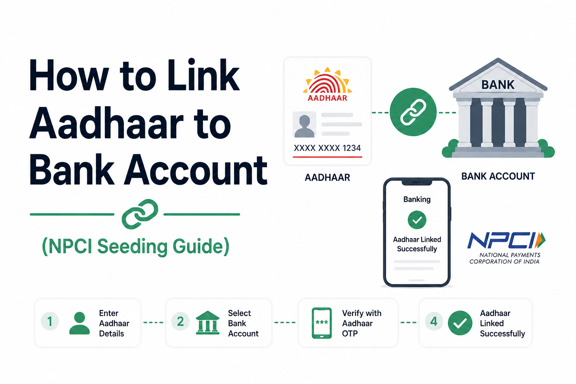
Linking your Aadhaar number to your bank account through NPCI seeding is essential for receiving Direct Benefit Transfer (DBT) payments, government subsidies, pensions, scholarships, and other welfare benefits. While many people assume Aadhaar linking and NPCI seeding are the same, they are actually two different processes.
In this guide, you’ll learn what NPCI seeding is, why it matters, how to link Aadhaar to your bank account, and how to check whether your Aadhaar is successfully mapped for DBT payments.
What Is Aadhaar Seeding with NPCI?
Aadhaar seeding is the process of linking your Aadhaar number with your bank account. Once the bank verifies your Aadhaar details, it sends the information to the National Payments Corporation of India (NPCI).
NPCI then maps your Aadhaar number with a specific bank account, enabling Direct Benefit Transfer (DBT) payments directly into that account.
Quick Explanation
| Process | Meaning |
|---|---|
| Aadhaar Linking | Aadhaar is linked to your bank account |
| NPCI Seeding | Aadhaar is mapped with the bank in NPCI records for DBT payments |
Simply linking Aadhaar with your bank account does not always guarantee that NPCI mapping is active. Both steps must be completed for DBT benefits.
“Start investing with confidence! Explore the
free demat account
and grow your wealth.”
Why Is NPCI Aadhaar Seeding Important?
NPCI seeding enables government departments to transfer benefits directly to eligible beneficiaries.
Benefits of Aadhaar Seeding
- Direct Benefit Transfer (DBT) credits
- LPG subsidy payments
- PM-KISAN benefits
- Pension disbursements
- Scholarship payments
- MGNREGA wage payments
- Government welfare scheme benefits
Without active NPCI mapping, you may not receive these payments even if your Aadhaar is linked to the bank.
Documents Required
Before starting the process, keep the following ready:
- Aadhaar Card
- Bank account details
- Registered mobile number
- Passbook or account proof (if required)
Most banks require the Aadhaar details to match the information available in UIDAI records.
How to Link Aadhaar to Your Bank Account
There are several ways to link Aadhaar with a bank account.
Method 1: Visit Your Bank Branch
This is the most reliable method.
Steps:
- Visit your bank branch.
- Request an Aadhaar Seeding Form.
- Fill in:
- Account number
- Name
- Aadhaar number
- Attach a copy of your Aadhaar card.
- Submit the form.
- Collect the acknowledgment receipt.
The bank will verify the details and update NPCI mapping.
Method 2: Internet Banking
Many banks allow Aadhaar linking online.
Steps:
- Log in to internet banking.
- Go to “Aadhaar Seeding” or “Update Aadhaar.”
- Enter your Aadhaar number.
- Confirm details.
- Submit the request.
- Complete OTP verification if required.
Processing may take a few working days.
Method 3: Mobile Banking App
Most major banks offer Aadhaar linking through their mobile apps.
Steps:
- Open the bank’s mobile app.
- Navigate to Services or Profile Settings.
- Select Aadhaar Linking.
- Enter Aadhaar details.
- Verify through OTP.
- Submit the request.
Method 4: ATM Aadhaar Linking
Some banks provide Aadhaar linking through ATMs.
Steps:
- Insert your debit card.
- Enter your PIN.
- Select Aadhaar Registration or Aadhaar Seeding.
- Enter your Aadhaar number.
- Confirm and submit.
You may receive a confirmation SMS after processing.
How to Check Aadhaar-Bank Linking Status
You can verify whether your Aadhaar is linked with your bank account through UIDAI.
Steps to Check Status
- Visit the UIDAI official website.
- Log in using your Aadhaar number and OTP.
- Navigate to the Aadhaar-Bank Account Linking Status section.
- View the bank mapped with your Aadhaar.
The status will show the bank currently mapped in NPCI records.
How to Check NPCI Mapping Status
You can also confirm NPCI seeding through your bank.
Options Available
- Bank branch inquiry
- Customer care support
- Internet banking portal
- Mobile banking application
Ask specifically whether your Aadhaar is “NPCI mapped” or “DBT enabled.”
How Long Does NPCI Seeding Take?
Processing times vary by bank.
| Method | Expected Time |
|---|---|
| Bank Branch | 2–7 working days |
| Internet Banking | 2–5 working days |
| Mobile Banking | 2–5 working days |
| ATM Request | 3–7 working days |
In some cases, verification may take longer.
Common Reasons for Aadhaar Seeding Failure
Several issues can prevent successful NPCI mapping.
Aadhaar Details Mismatch
Differences in:
- Name spelling
- Date of birth
- Mobile number
can cause rejection.
Inactive Aadhaar
An inactive or locked Aadhaar may prevent successful verification.
Multiple Bank Accounts Linked
If Aadhaar is linked with multiple accounts, only one account can generally be mapped as the primary DBT account at a time.
Bank Processing Delays
Banks occasionally experience delays in updating NPCI records.
What Happens If You Have Multiple Bank Accounts?
Aadhaar can be linked to multiple bank accounts, but NPCI typically maps only one account at a time for receiving DBT payments.
Usually, the most recently seeded account becomes the active DBT account.
If you want government benefits credited to a specific account, contact your bank and request NPCI mapping for that account.
How to Update or Change the NPCI-Mapped Bank Account
To change the bank account receiving DBT benefits:
- Visit the desired bank branch.
- Submit a fresh Aadhaar Seeding Form.
- Request NPCI mapping activation.
- Wait for processing confirmation.
Once updated, future DBT payments will be routed to the newly mapped account.
Common Mistakes to Avoid
Avoid these errors during Aadhaar seeding:
- Entering an incorrect Aadhaar number
- Using outdated bank account details
- Ignoring confirmation messages
- Assuming Aadhaar linking automatically means NPCI mapping
- Not verifying DBT status after seeding
A quick status check can help avoid missed subsidy or benefit payments.
Key Takeaways
- Aadhaar linking and NPCI seeding are related but different processes.
- NPCI mapping is required to receive Direct Benefit Transfer (DBT) benefits.
- You can link Aadhaar through a bank branch, internet banking, mobile app, or ATM.
- Processing usually takes a few working days.
- Always verify that your Aadhaar is NPCI mapped after linking.
- Only one bank account is generally active for DBT payments at a time.
Frequently Asked Questions
Q. Is Aadhaar linking mandatory for receiving DBT benefits?
Yes, most government subsidy and welfare schemes use Aadhaar-based DBT payments, making NPCI seeding necessary.
Q. Can I link Aadhaar to multiple bank accounts?
Yes. Aadhaar can be linked to multiple bank accounts, but NPCI typically maps one account as the primary DBT account.
Q. How can I know which bank account is mapped with NPCI?
You can check the Aadhaar-bank linking status through UIDAI or contact your bank directly.
Q. How long does Aadhaar seeding take?
Most requests are processed within 2 to 7 working days, depending on the bank.
Q. Can I change my DBT-linked bank account?
Yes. Submit a new Aadhaar seeding request with the bank where you want future DBT payments credited.
Conclusion
Linking Aadhaar to your bank account and ensuring proper NPCI seeding is crucial for receiving government subsidies, welfare payments, pensions, scholarships, and other Direct Benefit Transfer benefits. While the process is straightforward, it is important to verify that your Aadhaar is not only linked but also successfully mapped in NPCI records.
By following the steps outlined in this guide and checking your status afterward, you can ensure uninterrupted access to the benefits and payments you’re entitled to receive.
Disclaimer
The stocks mentioned in this article are not recommendations. Please conduct your own research and due diligence before investing. Investment in securities market are subject to market risks, read all the related documents carefully before investing. Please read the Risk Disclosure documents carefully before investing in Equity Shares, Derivatives, Mutual fund, and/or other instruments traded on the Stock Exchanges. As investments are subject to market risks and price fluctuation risk, there is no assurance or guarantee that the investment objectives shall be achieved. Lemonn (Formerly known as NU Investors Technologies Pvt. Ltd) do not guarantee any assured returns on any investments. Past performance of securities/instruments is not indicative of their future performance.
Related Posts



Download Lemonn
Download my app for seamless investment: investing app, etf investor app, share trading app , broking app, and demat account app—all in one!